
Contractor vs Employee Time Tracking: Different Rules
W-2 employees and 1099 contractors sit next to each other but have completely different time tracking rules. Get this wrong and you're looking at misclassification lawsuits.
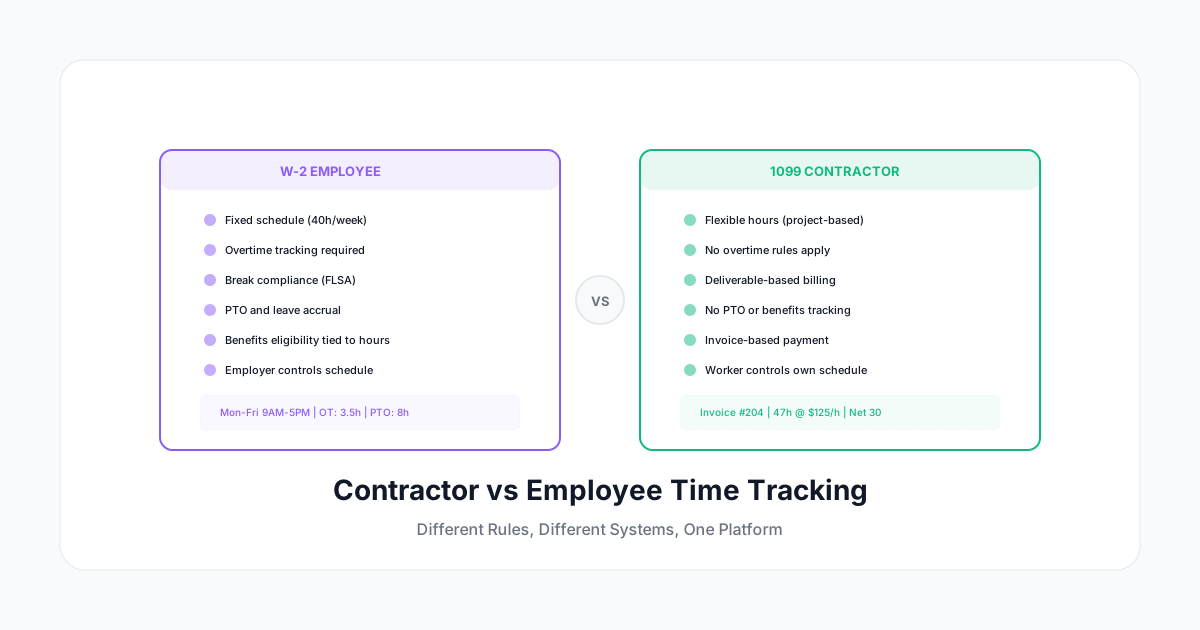
Your company likely works with both W-2 employees and 1099 contractors. They might sit next to each other, work on the same projects, and even use the same tools. But when it comes to time tracking, the rules are completely different.
Get this wrong and you're looking at misclassification lawsuits, overtime violations, tax penalties, and strained contractor relationships. Get it right and you have clean data, accurate billing, and compliance confidence.
Here's the complete guide to tracking time for both employee types — in one system, without creating legal headaches.
Why the Distinction Matters for Time Tracking
Legal Obligations Are Different
W-2 Employees:
- FLSA requires accurate time records for non-exempt employees
- Overtime (1.5x after 40 hours/week) must be tracked and paid
- Meal and rest break compliance is your responsibility
- You control their schedule
- PTO, sick leave, and benefits tie to hours worked
1099 Contractors:
- No FLSA overtime requirements
- No break compliance obligation (they manage their own time)
- You cannot control when or how they work (or it looks like misclassification)
- They bill you; you don't pay them a wage
- No PTO, no benefits, no schedule requirements
The Misclassification Risk
The IRS and Department of Labor look at behavioral control as a key factor in determining worker classification. If you:
- Require a contractor to clock in and out at set times
- Track their breaks
- Mandate specific working hours
- Apply overtime rules to their time
...you're treating them like an employee. That's a misclassification signal that can trigger audits, back taxes, benefits liability, and penalties.
The rule: Track contractor time for billing and project management purposes. Don't track it for schedule control or attendance monitoring.
Employee Time Tracking Requirements
What You Must Track (Non-Exempt)
- Total hours worked per day and per week
- Start and end times
- Overtime hours (daily and weekly, depending on state)
- Meal periods and rest breaks
- Any time worked off-the-clock (even if unauthorized)
What's Good Practice (But Not Required)
- Project and task allocation
- Billable vs non-billable categorization
- Time off requests and PTO balances
- Shift differentials and premium time
Common Employee Time Tracking Setup
Employee Time Entry:
├── Clock in (automatic schedule start)
├── Project/task assignment
├── Break tracking (meal + rest)
├── Overtime alerting (approaching 8h/day or 40h/week)
├── Clock out (automatic schedule end)
└── Manager approval workflow
The system controls: overtime calculations, break compliance, schedule adherence, and payroll integration.
Contractor Time Tracking (Different Rules)
What to Track
- Hours worked per project (for billing validation)
- Deliverables completed (for milestone billing)
- Client/project allocation (for budget tracking)
- Rate applied (different rates for different work types)
What NOT to Track
- Login/logout times (suggests schedule control)
- Break time (you don't manage their schedule)
- Location or attendance (they choose where and when to work)
- "Productive" vs "idle" time (that's surveillance of someone who isn't your employee)
Common Contractor Time Tracking Setup
Contractor Time Entry:
├── Project/task assignment
├── Hours logged (self-reported)
├── Activity description
├── Rate category
└── Invoice submission
The contractor controls: when they work, where they work, how they work. You validate that the hours and deliverables match the agreement.
One System, Two Configurations
You don't need separate software for employees and contractors. You need one system with different permission sets and rule engines:
Employee Configuration
| Feature | Setting |
|---|---|
| Clock in/out | Required |
| Schedule enforcement | Active |
| Overtime calculation | Automatic |
| Break tracking | Required |
| Manager approval | Required |
| Payroll integration | Active |
| PTO tracking | Active |
Contractor Configuration
| Feature | Setting |
|---|---|
| Clock in/out | Optional (self-service) |
| Schedule enforcement | Disabled |
| Overtime calculation | Disabled |
| Break tracking | Disabled |
| Manager approval | Optional (for billing validation) |
| Invoice generation | Active |
| Rate/budget tracking | Active |
The Key Difference: Control
For employees, the system enforces rules. For contractors, the system records activity for billing purposes. The distinction isn't just a feature toggle — it reflects the legal relationship.
Practical Scenarios
Scenario 1: Contractor Working Alongside Employees
A freelance designer works on the same project as your in-house team. They attend some of the same meetings. They use the same project management tools.
Correct approach:
- Designer logs hours to the project for billing
- Designer does NOT clock in/out with the team
- Designer is NOT subject to overtime rules
- Designer submits invoices based on tracked hours
- Budget tracking shows their hours alongside employee hours for project costing
Scenario 2: Contractor Approaching Budget Limit
You have a contractor with a 20-hour/week cap in their agreement. This week they've logged 18 hours by Wednesday.
Correct approach:
- Alert the project manager about approaching budget
- Discuss with the contractor whether remaining deliverables can wait until next week
- Do NOT mandate they stop working (you don't control their schedule)
- DO discuss project scope and whether the allocation needs adjustment
Scenario 3: Employee Doing Project Work and Admin
An employee spends time on client projects (billable) and internal work (non-billable). You need both for utilization metrics.
Correct approach:
- Track all hours (total must match payroll hours)
- Categorize as billable/non-billable
- Apply overtime rules to total hours regardless of category
- Track breaks and compliance on all working time
Scenario 4: Converting a Contractor to Employee
A longtime contractor is transitioning to full-time employment. On day one of employment:
Change immediately:
- Enable clock in/out requirements
- Activate overtime calculations
- Enable break tracking
- Set up schedule
- Begin PTO accrual
- Remove invoice-based billing
- Add to payroll integration
The time tracking configuration change should mirror the legal status change exactly.
Building Accurate Project Costs
One of the biggest advantages of tracking both types in one system: accurate project costing.
True project cost = (Employee hours × loaded rate) + (Contractor hours × billed rate)
The "loaded rate" for employees includes:
- Base salary (per hour)
- Benefits cost (typically 25-40% of salary)
- Employer taxes (7.65% FICA minimum)
- Overhead allocation (office space, equipment, tools)
A senior developer costing $75/hour in salary might have a loaded rate of $110-120/hour. A contractor billing $150/hour might actually be cheaper once you account for no benefits, no taxes, no overhead.
Time tracking data lets you make these comparisons accurately for budget planning and resource allocation decisions.
Red Flags to Avoid
Things That Signal Misclassification
- Requiring contractors to use the same time clock as employees
- Applying overtime rules to contractor hours
- Setting contractor schedules (must work 9-5)
- Tracking contractor breaks or lunch periods
- Rating contractor "attendance" or "punctuality"
- Denying contractor payment for hours over a set amount (without prior agreement)
Things That Are Perfectly Fine
- Requiring contractors to log hours for billing validation
- Setting project budgets and hour caps (agreed in the contract)
- Tracking contractor hours per project for cost allocation
- Requiring descriptions/notes on time entries
- Setting invoice submission deadlines (not work schedule deadlines)
- Reviewing time entries for reasonableness before payment
Setting Up Your System
Step 1: Classify Everyone Correctly
Before configuring time tracking, confirm everyone's legal classification. If you're unsure, consult employment counsel. The IRS three-factor test (behavioral control, financial control, relationship type) determines classification.
Step 2: Configure Role-Based Rules
Set up your time tracking system with at least two role types:
- Employee role: Full compliance features enabled
- Contractor role: Billing-focused features, compliance features disabled
Step 3: Separate Reporting
Build reports that respect the distinction:
- Employee reports: Focus on compliance, overtime, scheduling
- Contractor reports: Focus on budget utilization, project allocation, invoice validation
- Combined reports: Project costing only (blended for total project cost)
Step 4: Train Managers
Managers need to understand they manage employees and collaborate with contractors. The time tracking system should reinforce this distinction in how it presents data and actions for each type.
The Bottom Line
Employees and contractors are different legal relationships requiring different time tracking approaches. But they don't require different software — just different configurations within the same system.
A Human Time handles both elegantly: employee profiles get full compliance features (overtime, breaks, schedules, payroll sync), while contractor profiles get project tracking, budget management, and invoice-friendly exports. One system, two configurations, zero classification risk.
The key is respecting the distinction while maintaining unified project visibility. Track everyone's contribution. Control only the employees' schedule.